
 Log in / Register


WageWorks Visa® Prepaid Commuter Card &
Sun Tran Card Tutorial
Part 1: Ordering, and funding, a WageWorks Commuter Card
The WageWorks Commuter card is a pre-paid card that works like a credit card at transit agency ticket vending machines, ticket windows and mobile applications. In this order path you will be using the Commuter Card as a personal card, to purchase a Sun Tran product.
Step 1: Log onto your account on www.wageworks.com
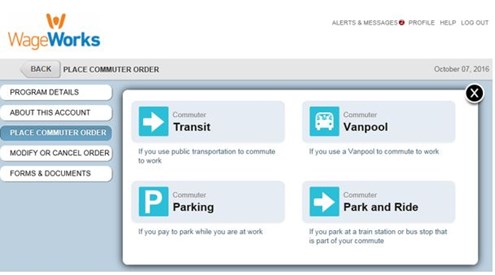
Step 2: Click on the "Commuter" link. Next, select "Enroll in Commuter" and then "Commuter Transit." Finally, select Sun Tran services as the service provider.
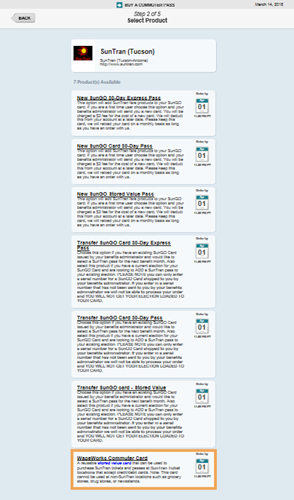
Step 3: Select the “WageWorks Commuter Card” pass product.
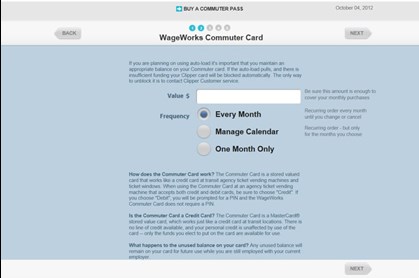
 Step 4: Select the amount you would like to have on your Commuter Card. To determine this amount, please identify how much you will need to support your monthly commute needs.
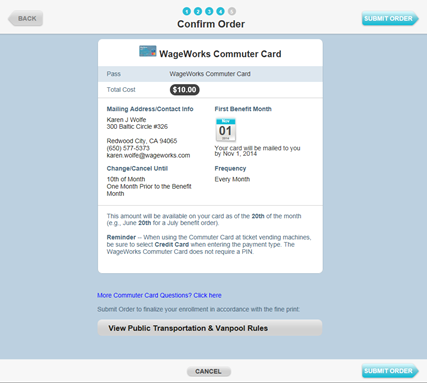
Step 5: Complete your order.
Please note:the Commuter Card funds load on the 20th of the month prior to the benefit month. The value will not be available until that date.
Step 6: Purchase your Sun Tran pass or tickets
Once your card has been loaded by the 20th of the prior month, you can then purchase the Sun Tran product of your choosing at any Sun Tran retail locations (excluding 3rd party merchants such as grocery stores, newsstands, etc.)
Part 2: Registering a SunGo Card
To realize the benefits of registration listed below, full fare passengers will go with a SunGO Card must create an account and register their card online at www.suntran.com/sungo. Economy fare passengers with a SunGO ID & Card are automatically registered at the time of issue from the Special Services office. SunGO Tickets cannot be registered.
The registration process is complete once the newly registered card is tapped on the farebox or ticket vending machine.
Please save your user ID and password after registration to avoid being locked out of your account after the third failed log-in.
Benefits of Registration
- Balance Protection - To protect the cash value and/or passes on a SunGO Card, we recommend registering your card. If a card is reported lost or stolen, Sun Tran can transfer the cash value or days remaining to a new card once one is purchased.
- Auto Buy* - Eliminates the need to track the cash value or days remaining on a SunGO Card or SunGO ID & Card. Registered cardholders can set up an account to automatically add value/pass through a secure funds transfer from a select credit or debit card on a regular basis. Auto Buy adds a predetermined cash value when the value on a card is depleted, or a new pass is added once the existing product is about to expire.
Register your card!
That way, if your card is ever lost, damaged or stolen, you can get a new card and Sun Tran will transfer the remaining passes from your old card to the new one.
- Go to www.suntran.com.
- Click on "Manage SunGO Card" button on the top right of the page.
- Scroll down to the bottom of the page. Click on "Sign Up: Become a SunGO Member."
- Fill in required information. Before pressing "Save", write down the user name and password you listed while registering, so you can get on the system in the future.
- Press “Save” button at bottom of page.
- You should now be in the Manage My Cards page. If you’re not on the Manage my Cards page, sign in as a registered user (on the bottom left of “Manage SunGO Cards” page) and Click on “Manage My Cards” on left navigation bar.
- Click on “Register a New Card” button (a green button near the top of the page).
- Type in the 10 digit card # on the bottom right of the card and name your card (e.g., “Jayden’s bus pass”), and click on “Register your Card”.

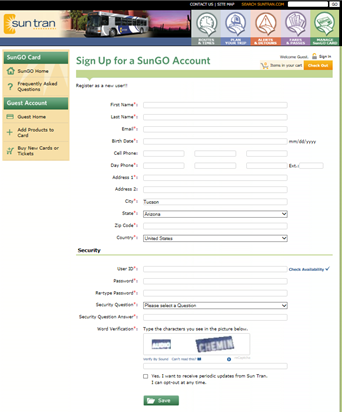
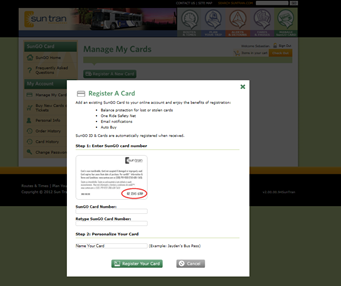
The registration process is complete, you have registered and created an online account. Once the newly registered card is tapped on the farebox or ticket vending machine.
On your SunGo Account, you can purchase new SunGO Cards and tickets or add a pass or cash value to existing cards. Economy fare passengers can add a pass or value to existing SunGO ID & Cards online, but it will take up to 48 hours to load on your card. Tickets cannot be loaded online.
Part 3: Add a Pass or Cash Value to Your Card
To load a pass or cash value to a SunGO Card or SunGO ID & Card already linked to your account:
- Go to www.suntran.com/sungo and sign into your account.
- Once you are signed into your account, you will be directed to Manage My Cards.
- Click on Buy Products.

- Click Pass by # of Days to select the type of pass or Value by $ Amount you wish to purchase from the drop down box.

- Click on Add to Cart.
- When you’ve added the passes or value you want to your card, Click on Check Out.

- Log on to your SunGO account and turn the Auto Buy feature OFF.
- Purchase the SunGO product online that you wish to automatically load on your card through the Auto Buy system. Be sure to pay using the new debit/credit card.
- Once the value/product loads to the SunGO card, log into SunGO account and turn Auto Buy feature back ON.
For passenger convenience, there are many locations to purchase a SunGO Card or ticket, add a pass or value to an existing SunGO Card or SunGO ID & Card or re-load a SunGO Ticket. The only location to qualify for the Economy Fare Program is the Special Services Office.
All SunGO sales are final.

Ticket Vending Machine (TVM)
Located at Ronstadt, Laos and Tohono transit centers, full fare passengers can purchase new SunGO Cards or Tickets. Full fare and economy fare passengers can add a pass or cash value to existing cards or re-load tickets.
The WageWorks Commuter Prepaid MasterCard is issued by The Bancorp Bank, member FDIC, pursuant to license by MasterCard International Incorporated. Card can be used at qualified locations everywhere Debit MasterCard is accepted. Card cannot be used cash access or at ATMs.
The WageWorks Visa Prepaid Commuter Card is issued by The Bancorp Bank, member FDIC, pursuant to a license from Visa U.S.A. Inc. Card can be used at qualified locations wherever Visa debit cards are accepted. Card cannot be used at any ATM or for cash access.